
The POS for bars, lounges and taprooms
Keep the rail moving: the bar as its own area on the floor plan, separate checks for guests sitting side by side, happy-hour prices that switch on by themselves, an age prompt on restricted items, and tips that pool by hours worked. POS software is $0/month with PalomaPOS processing — month-to-month, no cancellation fee.
Running a bar inside a restaurant? See the full-service restaurant POS — it is the same system.
A shift behind the bar
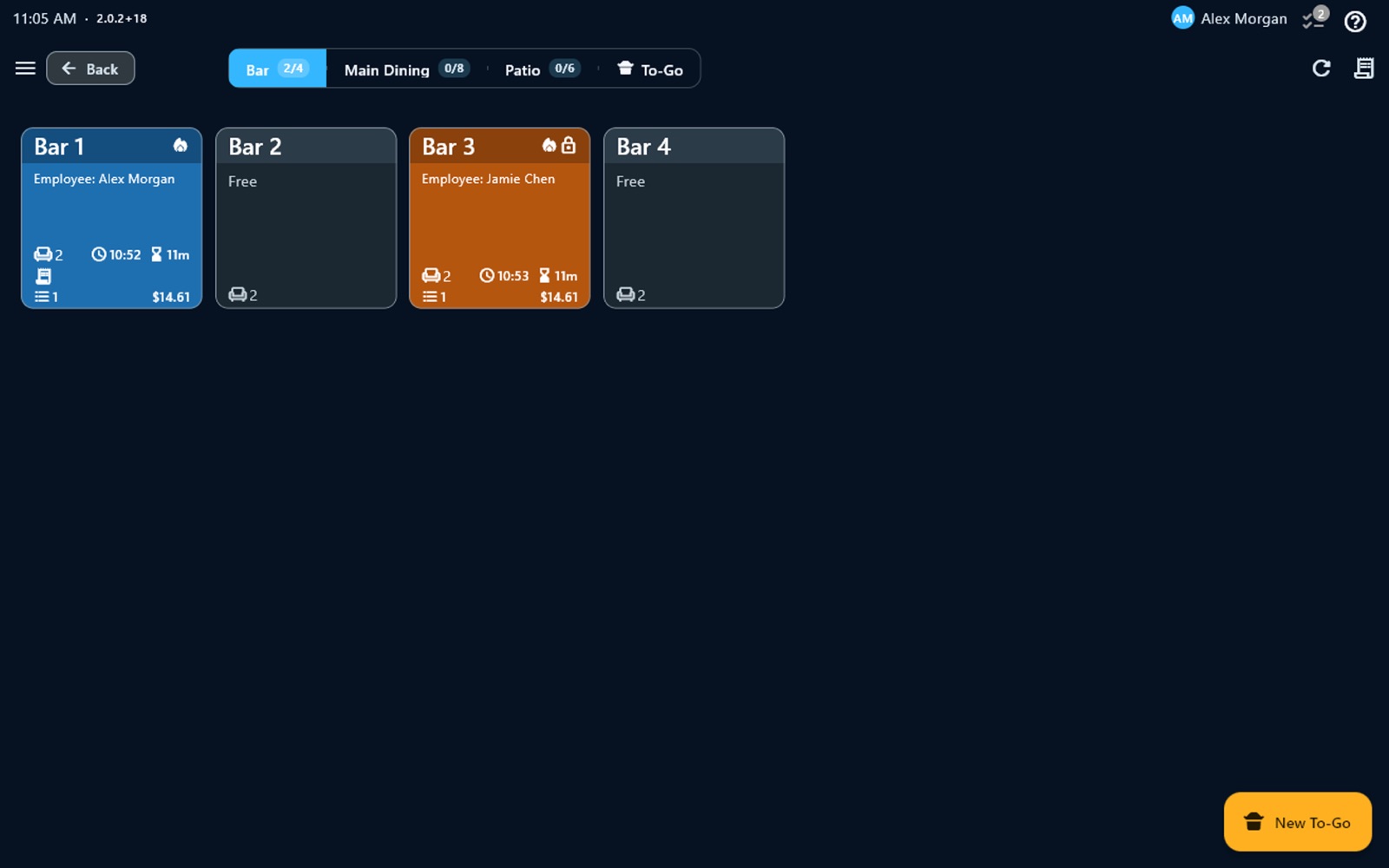
Open the rail. Bar stools and high-tops sit in a Bar area of the floor plan, beside main dining, the patio and to-go. Each spot shows who opened it, when, and what is on the check, so a bartender coming on shift sees the whole bar at a glance.
Pour it right. Modifiers cover pour sizes, mixers and garnishes; combos cover a beer and a shot; open-price items cover the bottle that isn't on the menu. When a keg kicks, put the item on the 86 list and nobody can ring it in.
Happy hour without a calculator. Build a rule — say, weekdays 4 to 7 PM — and list the items with their happy-hour price. The register switches those prices on and off by itself, including windows that run past midnight.
Ask before you pour. Items or whole categories can carry a minimum age. Before the first such item goes on a check, the register asks the bartender to confirm the guest's age; it asks once per check, not once per drink. You can also stop restricted items from selling during hours you set — a manager can override with their PIN.
Close out. Split by seat, item, evenly, amount, percent or number of guests. Guests tip on the screen or on the customer display, tips can be adjusted after payment, and at the end of the day the tip pool splits the tips by hours worked.
Built for bar service
The bar on the floor plan
Stools and high-tops live in their own Bar area next to main dining and the patio, each with its open check, bartender, time and total.
Separate checks side by side
Turn on several checks per table and two guests at the same stretch of bar keep their own checks — saved, printed and paid separately.
Happy hours that run themselves
Set a time window, days of the week and an optional date range, give items their happy-hour price, and the register switches prices on its own.
Age prompts on restricted items
Mark items or categories with a minimum age and the register asks the bartender to confirm the guest's age before the item goes on the check.
From the bar to a table
Guests finish their drinks and move to dinner — move the check to their table or merge it into the table's open check.
Split checks
Split by seat, item, evenly, amount, percent or number of guests when the group settles up.
Tips and tip pooling
Tips on screen or on the customer display, tip adjust after payment, and a tip pool split by hours worked.
Food to the kitchen, drinks to the bar
Kitchen display by station, and kitchen printers routed by category or item, so each ticket prints where it is made.
Good to know before you switch
- No card pre-authorization for tabs. PalomaPOS does not hold a guest's card to keep a tab open. Open checks live on a bar seat or table, and the guest pays at close-out.
- No ID scanning. The register prompts for the guest's age on restricted items; checking the ID is still your staff's job. PalomaPOS stores no birth dates.
When the Wi-Fi drops
Orders, cash payments, printing and the kitchen display keep working without internet, and devices on the same local network stay in sync with each other.
Card payments continue offline only through the offline mode of Valor terminals. Everything syncs when the connection returns; each device needs to reach the cloud at least once every 15 days.
How pricing works
- $0/month POS software with PalomaPOS processing
- Month-to-month, no cancellation fee — leave and you send the terminal back
- Hardware at cost, or free placement for qualifying volume
- Same-day funding and instant funding, with embedded banking
- Cash discount program — signage provided, the POS does the math, and we review the rules with you first
Moving your bar from another POS
We rebuild your drink menu with its modifiers, pour sizes and happy-hour rules as part of setup, migrate your data, and train your team remotely by video call. The hardware ships to you, it is not proprietary, and your data stays yours. Send a recent processing statement and a person will review it for free before you commit to anything.
Bar POS: FAQ
Can PalomaPOS run happy-hour pricing automatically?
Yes. A happy-hour rule has a time window, days of the week and an optional date range, and lists the items with their happy-hour price. While the window is open the register rings those items at the happy-hour price; when it closes, regular prices return. A window can run past midnight, and if two rules overlap on the same item, the lower price applies.
Does PalomaPOS check a guest's age?
PalomaPOS asks for it. You mark items or categories with a minimum age, and before such an item is added the register asks the bartender to confirm the guest is old enough — once per check. PalomaPOS does not scan IDs and stores no birth dates; checking the ID itself stays with your staff. You can also block items during hours you set, with a manager able to override by PIN, and the self-service kiosk sends guests to a cashier for age-restricted items.
Can guests sitting next to each other keep separate checks?
Yes. With several checks per table turned on, each guest at the same table or stretch of bar gets their own check, and each check is saved, printed and paid separately.
Can I hold a guest's card to keep a tab open?
Not today. Card pre-authorization for bar tabs is not available in PalomaPOS. Open checks are kept on a bar seat or table on the floor plan, and the guest pays when they close out.
Can a bar check move to a dining table?
Yes. You can move a check to another table, or merge it into the open check already on that table, so drinks at the bar and dinner end up on one bill if the guests want that.
How do bartender tips and tip pooling work?
Guests tip on the POS screen or on the customer-facing display, and tips can be adjusted after payment. The tip pool screen splits the day's tips by the hours each employee worked, taken from the built-in time clock.
What happens if the internet drops on a busy night?
Orders, cash payments, printing and the kitchen display keep working without internet, and devices on the same local network stay in sync. Card payments continue offline only through the offline mode of Valor terminals. Everything syncs when the connection returns; each device needs to reach the cloud at least once every 15 days.
How much does PalomaPOS cost for a bar?
POS software is $0/month when you process card payments with PalomaPOS, month-to-month with no cancellation fee — if you leave, you send the terminal back. Hardware is at cost, or placed free for qualifying processing volume, and menu build and data migration are included. Send your current processing statement and a person will review it for free.
Also see: Full-service restaurants · Quick-service restaurants · Tip pooling guide
Ready to Transform Your Business?
Book a free demo and send us your current processing statement — a person reads it and replies with a written quote.