
The POS for full-service restaurants
Run the floor, the kitchen and the money from one system: a floor plan with seats, coursing with hold and fire, split checks any way the table asks, tips that pool by hours worked, and a kitchen display by station. POS software is $0/month when you process with PalomaPOS — month-to-month, no cancellation fee.
Prefer to start with numbers? Send us your current processing statement — a person reviews it for free.
How a table moves through PalomaPOS
Full service is a sequence, not a single sale. Here is the path a four-top takes from the host stand to the tip pool.
- 1
Seat the table
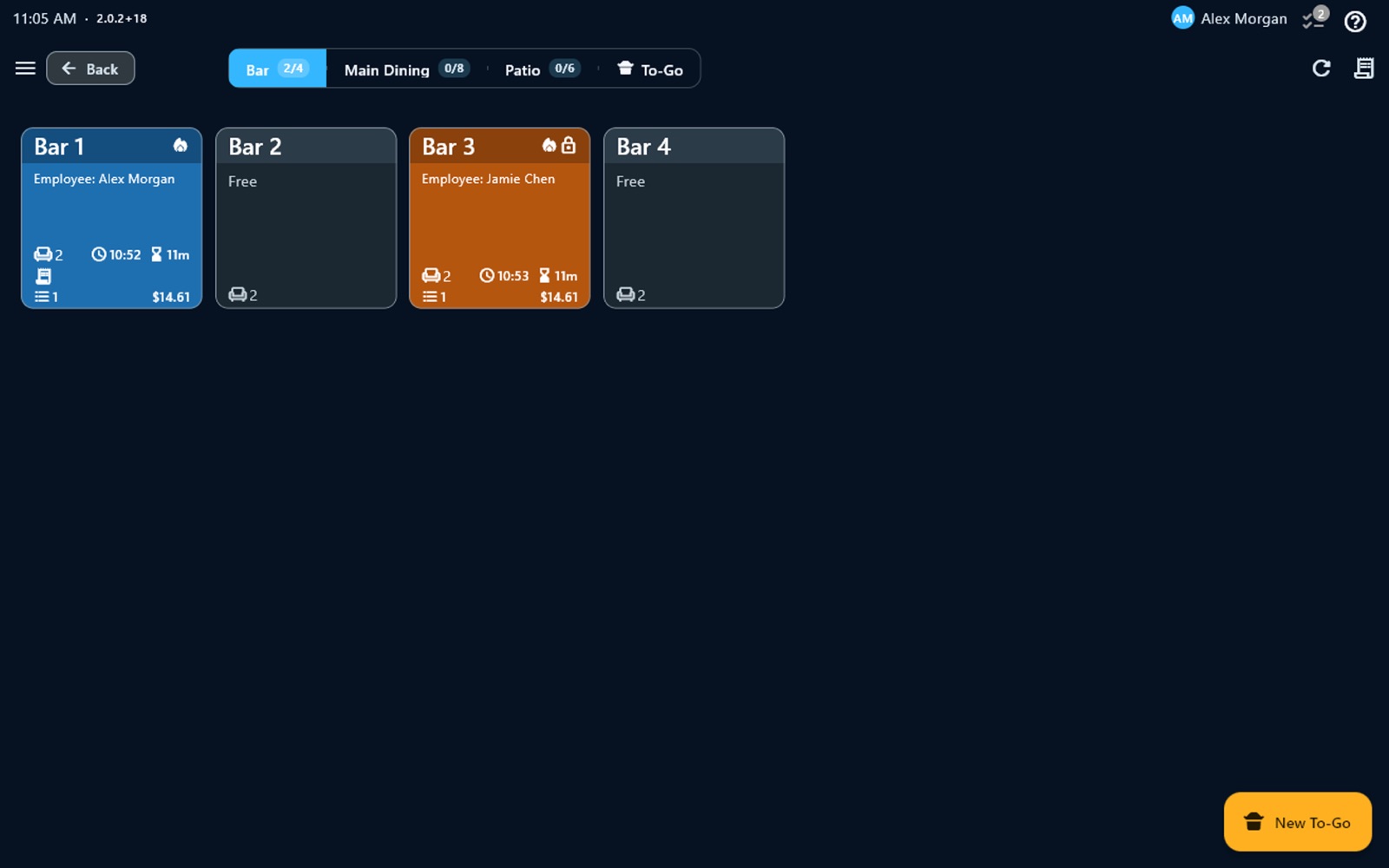
Your floor plan is split into areas — main dining, patio, bar, to-go. Every table shows who is serving it, how long it has been open and the running total, so a manager can read the room from one screen.
- 2
Order by seat
Ring items to Seat 1, Seat 2 or the center of the table, with modifiers, combos and open-price items. Anything on the 86 list can't be rung in, so the server finds out before the guest does.
- 3
Course and fire
Put each line on a course, hold a line for a set number of minutes, or fire it to the kitchen right away. Appetizers go out first; mains wait until the server sends them.
- 4
The kitchen sees it by station
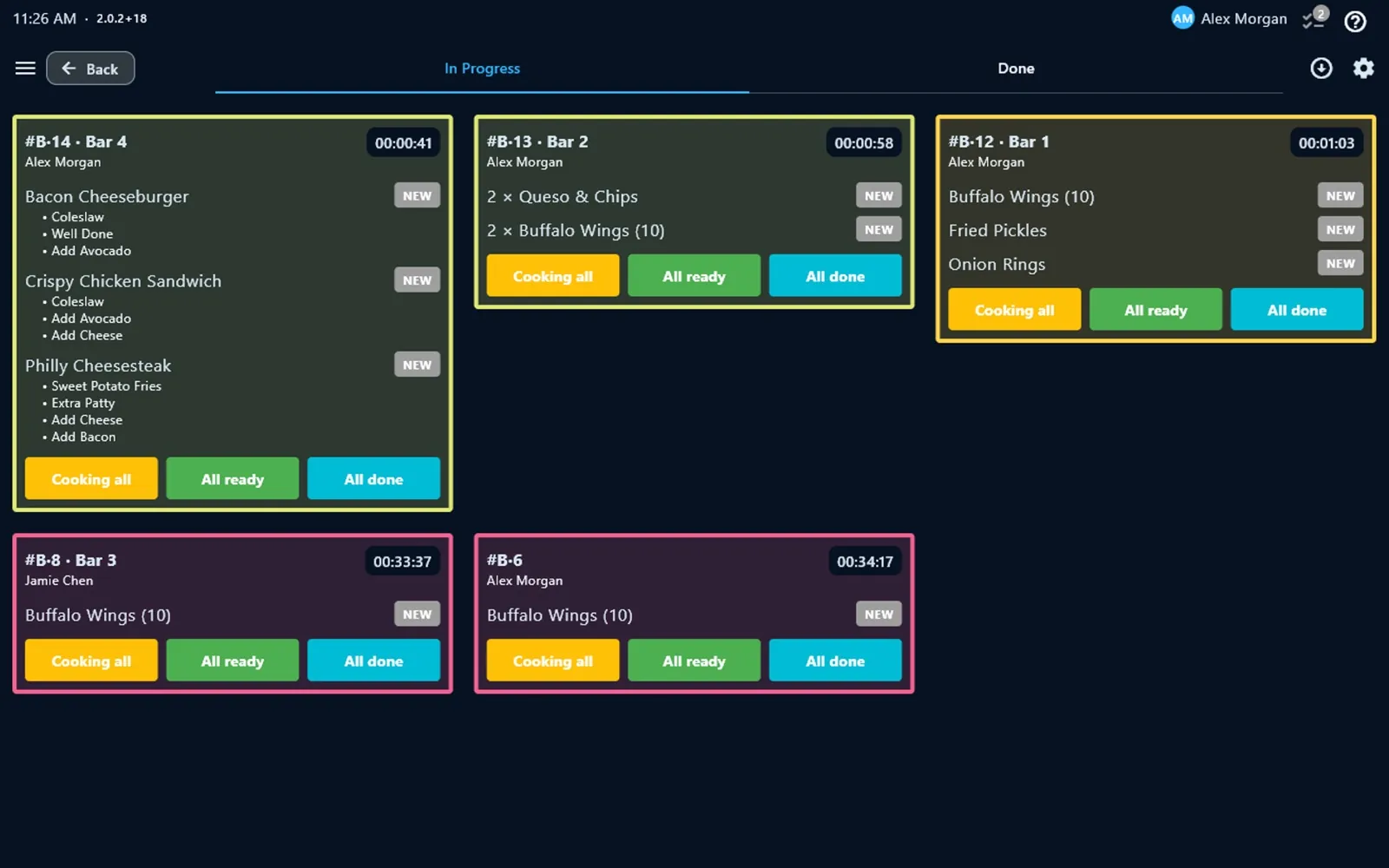
Tickets land on the kitchen display for the right station, with the table, the server and a timer on every order. Kitchen printers can be routed by category or by item — grill to the grill, drinks to the bar.
- 5
Split and pay
Split the check by seat, by item, evenly, by amount, by percent or by number of guests. Guests tip on the POS screen or on the customer-facing display.
- 6
Adjust and close
Adjust a tip after the payment went through, then run the tip pool by hours worked at the end of the shift — the time clock already has the hours.
Built for table service
Floor plan and table moves
Move a check to another table, merge two tables, or let one table carry separate checks when a party pays apart.
Seats and coursing
Order by seat, group lines into courses, and hold or fire each line when the table is ready.
Split checks
By seat, item, evenly, amount, percent or guests — each check is printed and paid on its own.
Tips and tip pooling
Tips on screen or on the customer display, tip adjust after payment, and a tip pool split by hours worked.
Auto gratuity for large parties
Add a service charge automatically above the party size you set, only on the order types you choose.
Kitchen display by station
Orders by station with timers, kitchen printer routing, and an order-ready board for pickup guests.
Taxes and fees
Sales tax added or included, multiple taxes and fees, and tax-exempt orders.
Roles and permissions
PIN sign-in, a time clock, and manager authorization for removing items that were already sent.
When the internet drops on a Saturday night
Orders, cash payments, printing and the kitchen display keep working without internet, and the devices on your local network stay in sync with each other — the server's order still reaches the kitchen screen.
Card payments continue offline only through the offline mode of Valor terminals. Everything syncs when the connection returns, and each device needs to reach the cloud at least once every 15 days.
How pricing works
- $0/month POS software with PalomaPOS processing
- Month-to-month, no cancellation fee — if you leave, you send the terminal back
- Hardware at cost, or free placement for qualifying processing volume
- Same-day funding and instant funding, with embedded banking
- Cash discount program: signage provided and the POS handles the math — we review the card-network and state rules with you before you turn it on
- Free menu build and data migration
See how pricing works · Estimate your effective processing rate · Cash discount vs. surcharge
Switching from Toast, Square or Clover
Most full-service restaurants that talk to us already have a POS. Switching is mostly a menu job and a training job, and both are on us: menu build and data migration are included, setup and training happen remotely by video call, and the hardware ships to you. Your data is yours, and the hardware is not proprietary — nothing locks you in, which is also why the agreement is month-to-month.
Before you decide, compare what you have today feature by feature — coursing, split options, tip pooling, offline behavior — and look at what you actually pay per month for software and processing.
Get your processing statement reviewed — free
Send a recent statement from your current processor. A person reads it, explains what you are paying today, and replies with a written quote. No obligation.
Full-service restaurant POS: FAQ
Does PalomaPOS support coursing for full-service restaurants?
Yes. Each line on a check can be assigned to a course, held (including for a set number of minutes) or fired to the kitchen right away. The kitchen display shows the course on each ticket, so the line knows what to start now and what to wait for.
How do split checks work?
You can split a check by seat, by item, evenly, by amount, by percent or by number of guests. Each resulting check is printed and paid separately, and the POS keeps track of what has been paid until the whole table is settled.
How do tips and tip pooling work?
Guests can tip on the POS screen or on the customer-facing display, and a tip can be adjusted after the payment. At the end of the day, the tip pool screen splits the tips collected by the hours each employee worked, using the hours from the built-in time clock.
What happens if the internet goes down during service?
Orders, cash payments, printing and the kitchen display keep working without internet, and devices on the same local network stay in sync with each other. Card payments continue offline only through the offline mode of Valor terminals. Everything syncs when the connection is back; each device needs to reach the cloud at least once every 15 days.
How much does PalomaPOS cost for a full-service restaurant?
POS software is $0/month when you process card payments with PalomaPOS. It is month-to-month with no cancellation fee — if you leave, you send the terminal back. Hardware is sold at cost, or placed free for qualifying processing volume. Processing is quoted from your current statement, which a person reviews for free.
Can I switch to PalomaPOS from Toast, Square or Clover?
Yes. Menu build and data migration are included at no charge. Setup and training happen remotely by video call, and the hardware ships to you. Your data is yours, and the hardware is not proprietary.
What hardware does PalomaPOS run on?
PalomaPOS runs on Valor and Sunmi POS terminals with built-in printers, on Android tablets and phones, and on iPhone and iPad. The same app drives the kitchen display, the customer-facing display and the self-service kiosk mode.
Is support available in Spanish?
Yes. Support is provided by people, in English and Spanish, Monday to Friday from 9 AM to 6 PM Eastern Time, and the POS app itself is available in English and Spanish.
Also see: POS for bars · Quick-service restaurants · Tip pooling guide · Hardware
Ready to Transform Your Business?
Book a free demo and send us your current processing statement — a person reads it and replies with a written quote.